
- The CIS compliance checking script is not impacted. Users should continue using it to determine tenancy compliance with the CIS OCI Foundations Benchmark.
- Users looking for a deployment experience similar to CIS Landing Zone should now use OCI Core Landing Zone, where the same features are available. OCI Core Landing Zone evolves CIS Landing Zone and complies with CIS OCI Foundations Benchmark.
- Users looking for a deployment experience based on fully declarable and customizable templates should use the Operating Entities Landing Zone or the OCI Landing Zones Modules in the OCI Landing Zones GitHub organization.
Introduction
OCI Secure Landing Zone can configure your tenancy for Exadata Cloud Service (ExaCS) deployments, making the task of provisioning ExaCS systems quick and consistent.
The Landing Zone creates one or more VCNs configured for ExaCS, in accordance with the network requirements described in https://docs.oracle.com/en-us/iaas/Content/Database/Tasks/exanetwork.htm. It can also create a compartment for the ExaCS infrastructure, in which case an admin group for ExaCS is provisioned. Optionally, customers can choose not to create this compartment, making ExaCS managed by the Database admin group.
Note: The Landing Zone does not provision any ExaCS infrastructure, VM clusters or database systems. It is all about configuring the environment (networking and IAM) where those resources are further deployed.
Networking
The VCN(s) created for ExaCS are comprised of two regional private subnets, client and backup. All routing and security rules are configured in tandem with the overall Landing Zone setup, according to given parameters for Landing Zone networking and connectivity. Landing Zone creates all required rules for ICMP, SQLNet, ONS (Oracle Notification Service) and SSH connectivity.
Landing Zone defines the following input variables for ExaCS configuration:
- exacs_vcn_cidrs: list of CIDRs to be used when creating the VCNs. Each CIDR indicates the creation of one VCN. Make sure they do not overlap with 192.168.128.0/20.
- exacs_vcn_names: list of VCN names to override default names with. Each name applies to one VCN, the nth element corresponding to exa_vcn_cidrs’ nth element.
- exacs_client_subnet_cidrs: list of CIDRs for the client subnets. Each CIDR applies to one VCN, the nth element corresponding to exa_vcn_cidrs’ nth element.
- exacs_backup_subnet_cidrs: list of CIDRs for the backup subnets. Each CIDR applies to one VCN, the nth element corresponding to exa_vcn_cidrs’ nth element.
Note: exacs_client_subnet_cidrs, exacs_backup_subnet_cidrs and exacs_vcn_names are optional for deploying ExaCS.
If exacs_client_subnet_cidrs, exacs_backup_subnet_cidrs are not provided, the Landing Zone calculates the subnets CIDR ranges by adding 4 bits to the network mask (a.k.a the CIDR prefix) and 1 (one) to populate the net number, representing the additional bits added to prefix, starting with the client subnet. For a VCN CIDR of 10.0.0.0/20, the client subnet CIDR would be 10.0.0.0/24, while the backup subnet CIDR would be 10.0.1.0/24. Landing Zone accomplishes this using the cidrsubnet built-in Terraform function.
If exacs_vcn_names are not provided, Landing Zone creates default VCN names per pattern <service-label>-<index>-exa-vcn, where <service-label> is a Landing Zone variable used to prefix the resource names it creates and <index> refers to the VCN CIDR in exacs_vcn_cidrs variable, starting with 0 (zero).
ExaCS IP Addressing and Naming Requirements
Depending on their sizes, ExaCS racks have different requirements for IP addressing, as described in “Requirements for IP Address Space” section in https://docs.oracle.com/en-us/iaas/Content/Database/Tasks/exanetwork.htm. For deploying ExaCS database systems, customers must plan accordingly when defining the CIDR ranges for ExaCS VCNs and subnets.
As for naming, ExaCS RAC (Real Application Clusters) nodes have specific naming requirements that influence how networking resources should be named. An ExaCS node FQDN (fully qualified domain name) has the form:
<hostname>-<suffix>.<subnet_domain_label>.<vcn_domain_label>.oraclevcn.com
In general, the FQDN string has a maximum total limit of 63 characters, with the following recommended maximum for each substring as:
- <hostname>: 12 chars max. localhost string not allowed. This is provided when actually deploying the ExaCS infrastructure.
- <suffix>: a random 5-letter string with the node number at the end. This is automatically appended by the Database service. The preceding hyphen is also added by the Database service.
- <subnet_domain_name>: 14 chars max. Hyphens and underscores not allowed.
- <vcn_domain_label>: 14 chars max. Hyphens and underscores not allowed.
FQDN substrings in red are created by the Landing Zone, with the following logic:
<vcn_domain_label>
- strips off any non alphanumeric characters from the VCN name;
- takes the first 11 characters from the resulting substring;
- appends the region key.
As an example, for a VCN named exavcn-dev in Ashburn region, the <vcn_domain_name> would be exavcndeviad.
<subnet_domain_name>
- made of the subnet name. Client subnet is cli and backup subnet is bkp.
IAM
By default, the Landing Zone creates a compartment for ExaCS infrastructure along with an ExaCS admin group and associated policies. We understand that some organizations may want to have this separation for stronger isolation, as opposed to others that have the ExaCS infrastructure managed by database administrators in the Database compartment. There is a single input variable controlling this behavior:
- deploy_exainfra_cmp: whether to deploy a compartment for ExaCS infrastructure. Default is true, in which case an admin group and associated polices are also created. Database admins are entitled to use the infrastructure when deploying database systems. If set to false, neither the compartment nor the admin group are created, and policies to manage ExaCS infrastructure are granted to Database admins.
Configuration Example
Hypothetically, let’s say we want to configure two ExaCS VCNs, dev and prd, and ExaCS infrastructure to be owned by the same group. Such an approach is not a generic architecture recommendation, but included here more to illustrate Landing Zone capabilities and the mechanics how to use the input variables. There are a few possibilities for segregating ExaCS databases, ranging from a single ExaCS infrastructure within a single VCN with multiple Portable Databases (PDBs) to multiple ExaCS infrastructures each in a separate VCN managed by different groups.
Here’s how variables should be assigned in Landing Zone’s input variables file:
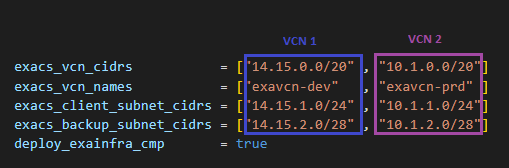
The networking variables should be seen as a matrix, which each column describing one VCN, as highlighted.
In OCI Resource Manager these variables are exposed in a very similar way:
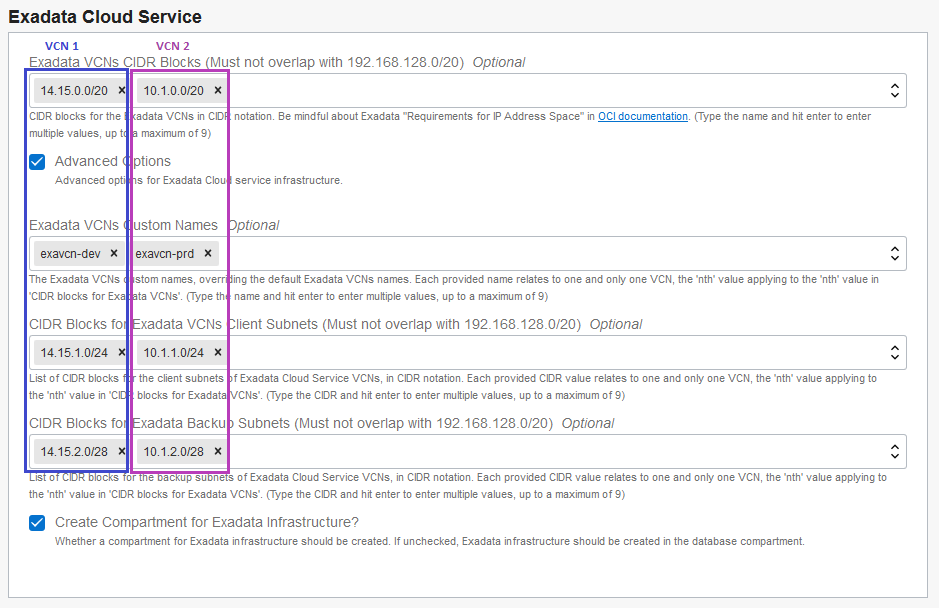
The given configuration would deploy an architecture depicted in the following diagram, with ExaCS related resources highlighted in red (click the diagram for a larger view).

In the Network compartment we see some greyed-out resources, including DMZ VCN, DRG and DRG Attachments, representing one Landing Zone deployment possibility when ExaCS VCNs are made spokes in a Hub & Spoke architecture. See how the ExaCS VCNs match Landing Zone variables assignments shown above.
As deploy_exainfra_cmp is true, Landing Zone deploys the ExaCS compartment (exainfra-cmp) along an admin group for ExaCS infrastructure management, with the following policy grants assigned:
Allow group exainfra-admin-group to manage cloud-exadata-infrastructures in compartment exainfra-cmp
Allow group exainfra-admin-group to manage cloud-vmclusters in compartment exainfra-cmp
Allow group exainfra-admin-group to read work-requests in compartment exainfra-cmp
Deploying and managing databases remains the responsibility of database administrators. The following policy grants are assigned:
Allow group database-admin-group to read cloud-exadata-infrastructures in compartment exainfra-cmp
Allow group database-admin-group to use cloud-vmclusters in compartment exainfra-cmp
Allow group database-admin-group to read work-requests in compartment exainfra-cmp
Allow group database-admin-group to manage db-nodes in compartment exainfra-cmp
Allow group database-admin-group to manage db-homes in compartment exainfra-cmp
Allow group database-admin-group to manage databases in compartment exainfra-cmp
Allow group database-admin-group to manage backups in compartment exainfra-cmp
Note: this is Landing Zone default behavior. It can be changed by setting deploy_exainfra_cmp to false, making database administrators the owners of ExaCS infrastructure.
Next Deployment Steps
With the basic networking and IAM configuration in place, the next step is provisioning the ExaCS infrastructure, VM cluster and database system (these are not provisioned by Landing Zone).
The following picture of OCI Console shows such resources (in blue) created on top of Landing Zone provisioned resources (in red).

For More Information
- OCI Secure Landing Zone Git Hub repository: https://github.com/oracle-quickstart/oci-cis-landingzone-quickstart
- Exadata Cloud Service: https://docs.oracle.com/en-us/iaas/Content/Database/Concepts/exaoverview.htm