
Intro
Whether you’re seeking a thrill from CSI Miami’s “black magic” hacking, or you are a security practitioner watching the latest news about ransomware attacks, unethical hacking has the potential to disrupt systems that we use every day. In this blog post, I will walk through a deployment hackers use to penetrate systems and gain access to valuable data. In future blogs, we will analyze and get practical experience defending against these attacks with Oracle Cloud!
There are two appliances we will install on OCI to simulate an attack.
Kali Linux – a readily available linux distribution with over 600 penetration testing tools.
Metasploitable3 – an intentionally vulnerable image that can be broken into with Kali Linux.
Check out the YouTube video, or get started below!
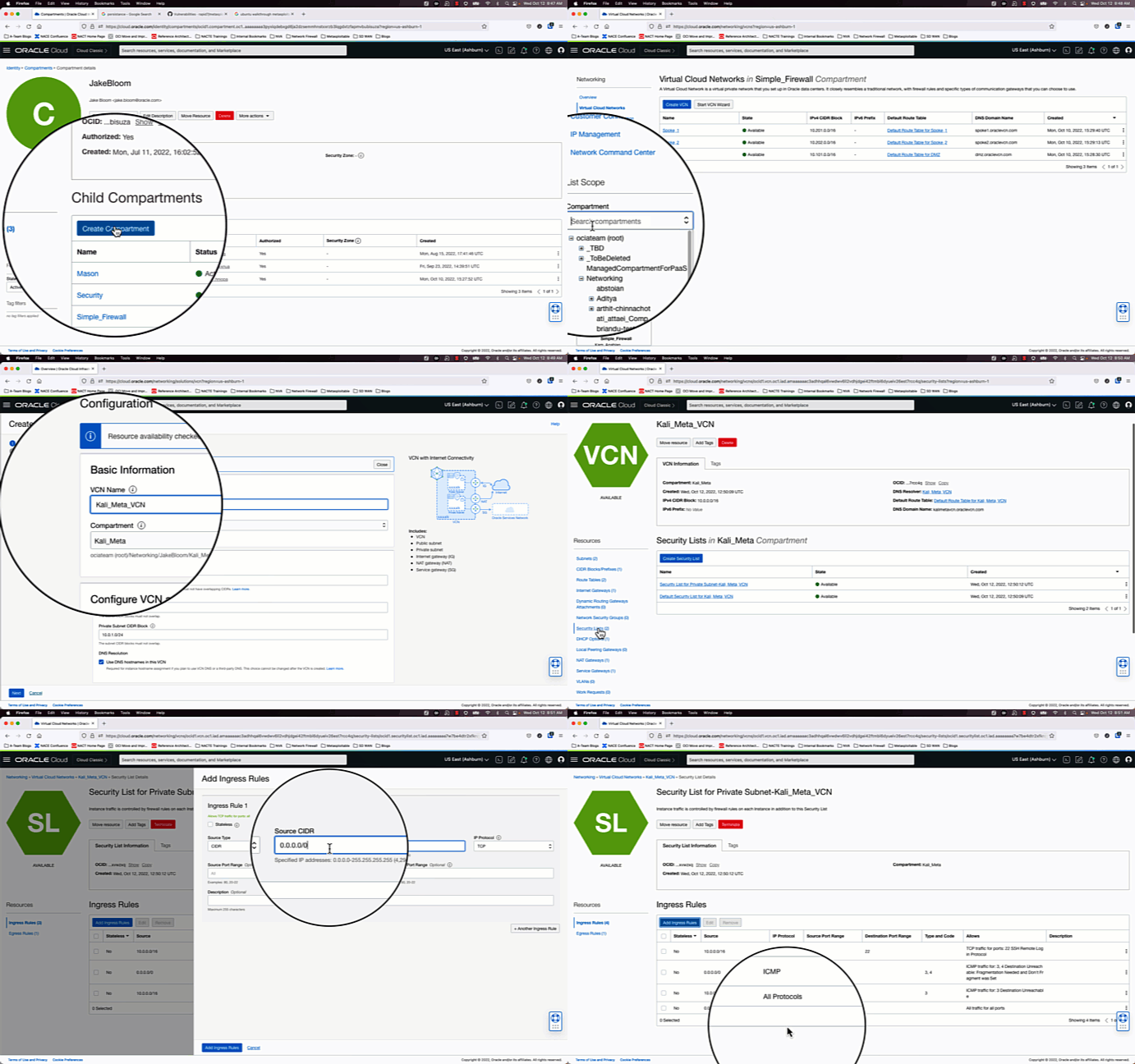
1.) Create a VCN using the VCN Wizard and create a new compartment.
Since our goal is to make a simple test deployment, we will go with the path of least resistance and create a VCN using the VCN wizard, and open all ports and protocols on the private and public security lists. These settings will be changed later.
2.) Deploy and set up a Kali Linux instance
Deploy a Kali Linux Image from the Oracle Images Repository into a VCN with a public subnet, and enable remote desktop to use the web browser.
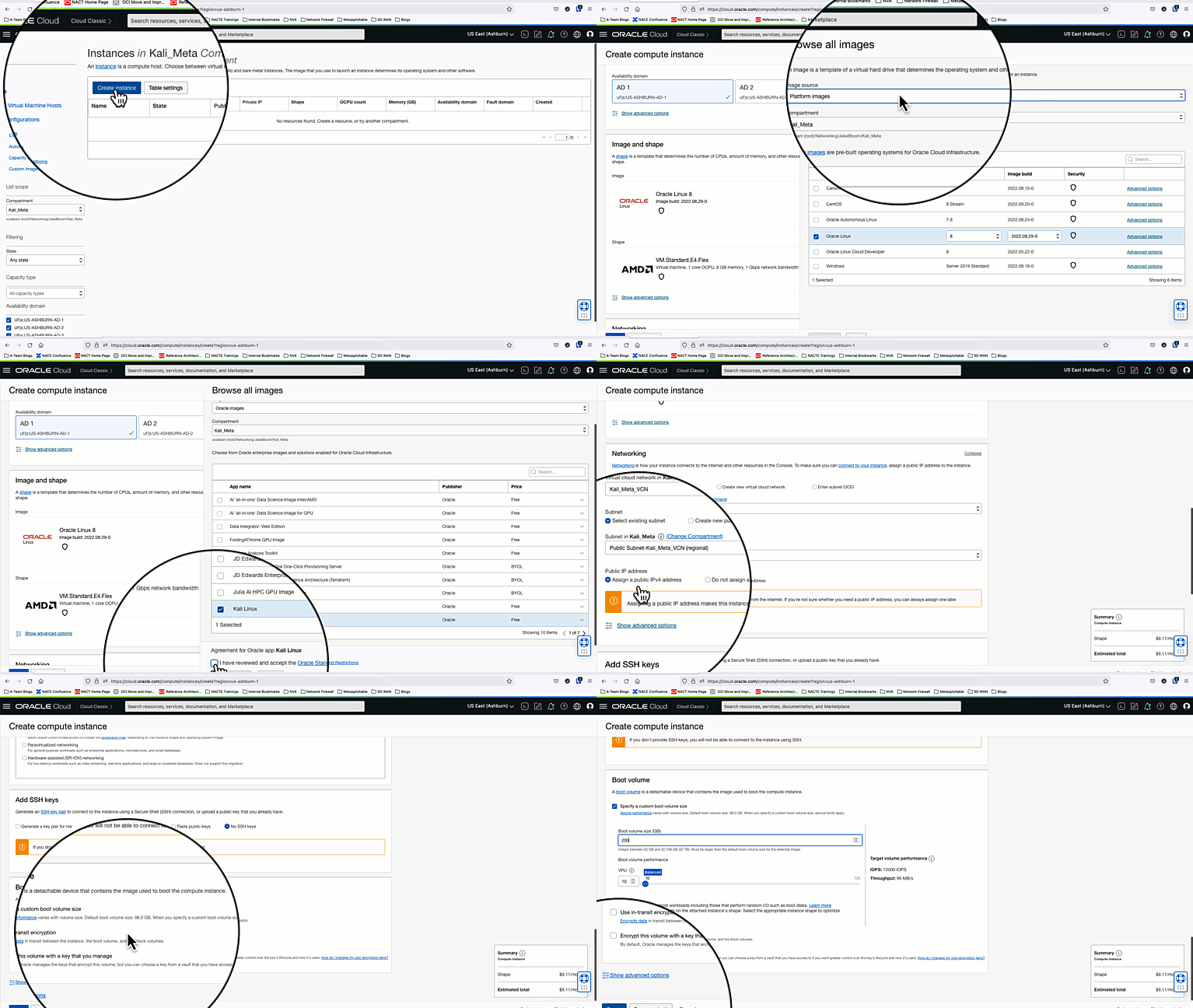
Once the instance is in a running status, go to “Instance Details” and create a console connection. User/pass is debian/debian
Reset the default debian user password:
passwd debian
Note: Before moving to the next step, please keep in mind that on this Kali image (V2) one of the repo keys expired as of 2023-01-16. This means that you will have some issues doing updates and/or installing other applications.
debian@kali-linux-oci:~$ apt-key list
……..
/etc/apt/trusted.gpg.d/kali-archive-keyring.gpg
-----------------------------------------------
pub   rsa4096 2012-03-05 [SC] [expired: 2023-01-16]
      44C6 513A 8E4F B3D3 0875  F758 ED44 4FF0 7D8D 0BF6
uid           [ expired] Kali Linux Repository <devel@kali.org>
To resolve this, just add the new key:
wget -q -O – https://archive.kali.org/archive-key.asc | sudo apt-key add
There are two ways of making RDP work. I recommand the second approach:
a. Run these commands to enable RDP (this will take some time because it will do a clean upgrade). This is a script provided by Kali to ensure everything is installed for RDP with Xfce. More details can be found here.
wget https://gitlab.com/kalilinux/recipes/kali-scripts/-/raw/main/xfce4.sh
chmod +x xfce4.sh
sudo ./xfce4.sh
sudo systemctl enable xrdp –now
After the installation of RDP is complete, reboot Kali Linux and RDP to PUBLIC_IP:3390
b. The Kali image (V2) in OCI Markeplace has already all the prerequisites to start using RDP. Unfortunately, there seems to be a bug in the current installed XRDP version. If you try to start XRDP deamon it will fail. The reason for that is a missing log file “/var/log/xrdp.log”.
To resolve this run the following commands:
sudo touch /var/log/xrdp.log
sudo chown xrdp:xrdp /var/log/xrdp.log
sudo systemctl restart xrdp
RDP should be working now and it will listen on the default port 3389.
3.) Setup Metasploitable3
Metasploitable3 is an intentionally vulnerable image. This is for testing only. If you are not aware of the risks of running this instance, you should stop here.
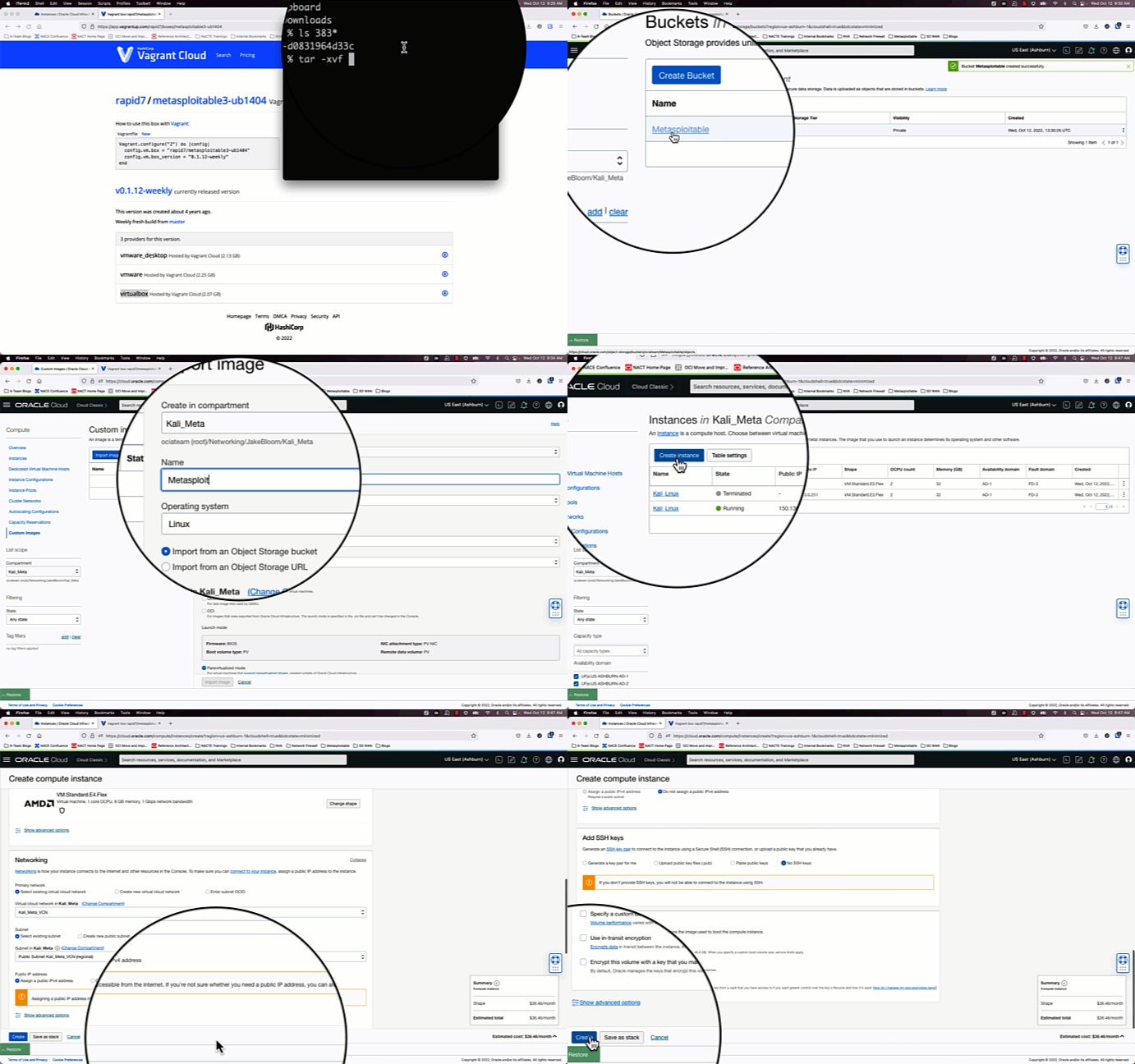
Download Rapid7’s preconfigured Metasploitable3 Ubuntu 14.04 image for Virtualbox
https://app.vagrantup.com/rapid7/
Extract the download, and then upload the .vmdk file to an OCI bucket to be used as a custom image.
Create a cusom image with the Metasploitable3 object, and check the “emulated” option.
After the custom image is created, deploy the image to your private subnet.
4.) Testing the setup
After creating an RDP session to Kali, connectivity between Kali and Metasploitable can be verified by going to the Kali web browser or cURL the IP address of Metasploitable3 and verify data is returned. Afterwards, you can start your gamut of tests on the Metasploitable3 instance. Many vulnerabilities are documented here, and a quick google search “ubuntu metasploitable3 walkthrough” will yield many results to break into the Metasploitable VM. I also recommend running the OCI Vulnerability Scanner, which will test the open ports on the Metasploitable3 and expose it’s vulnerabilities.
In Conclusion . . .
Now we have a functional toolset to perform vulnerability testing. In subsequent posts, we dive into more advanced OCI configurations to properly defend against these vulnerabilities.