
Introduction
Integrating Microsoft 365 services with Oracle Integration Cloud (OIC) requires careful configuration of API permissions to ensure secure and efficient access to resources. The Fusion Application Social Network Integration (FASNI) sample demonstrates how to connect Oracle Fusion Applications with Microsoft Teams using Graph API. However, granting unnecessary permissions can pose security risks and increase compliance burdens.
This post supplements the existing FASNI documentation by outlining the minimal set of Graph API permissions required for the sample to function. By adhering to the principle of least privilege, organizations can ensure that their integrations remain both functional and secure. Additionally, we will map out the specific OIC integrations that invoke Graph API calls, helping administrators understand where and how these permissions are applied.
Graph API Permissions Overview
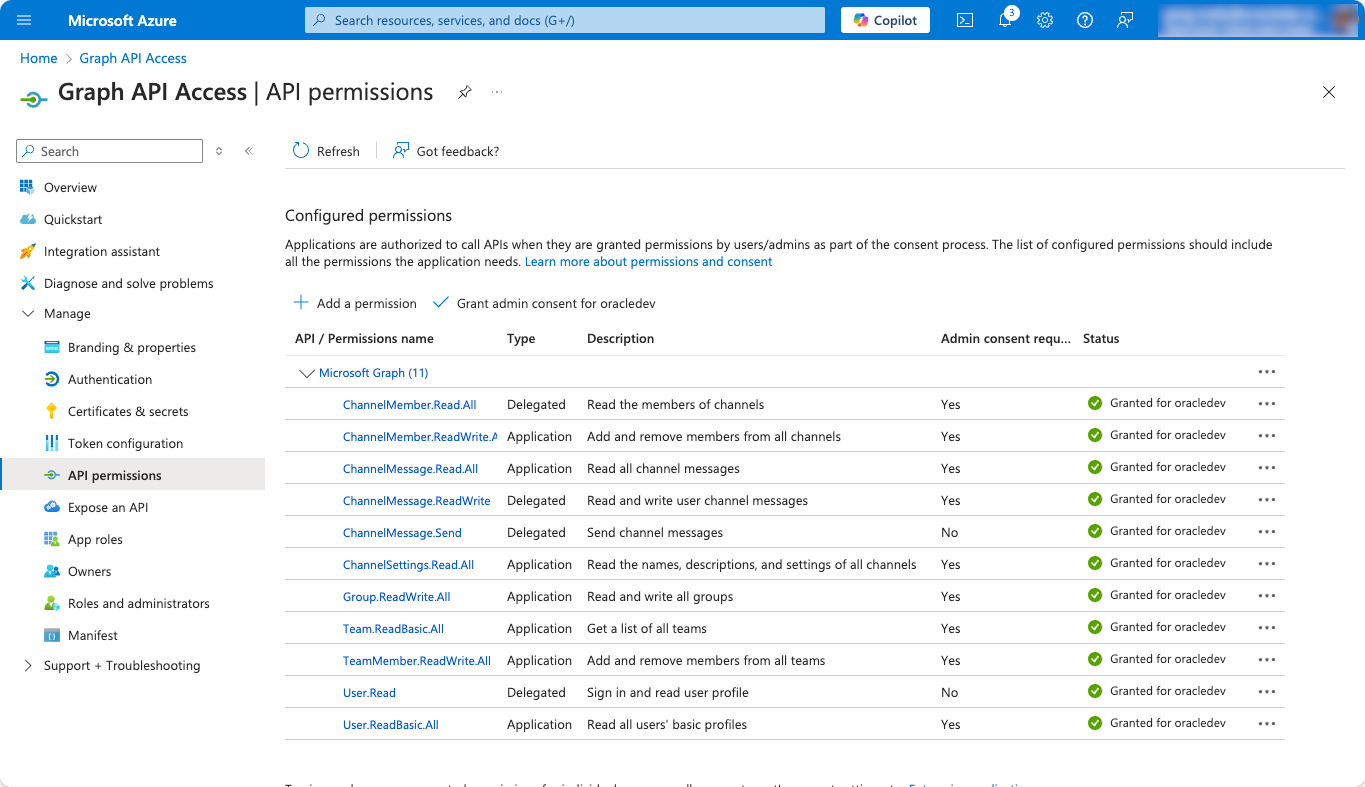
The FASNI sample relies on Microsoft Graph API to interact with Microsoft Teams, requiring specific permissions to function correctly. The following screenshot provides a detailed view of the minimal API permissions required for integration.
Microsoft Graph API defines two types of permissions:
Application Permissions – These are used when the API calls are not tied to a specific user but rather to the registered application itself. This is necessary for operations such as reading channel messages, managing members, or accessing basic team settings. Since these permissions apply at the application level, they require admin consent before use.
Delegated Permissions – These are required when an API call must be made on behalf of a signed-in user. For example, when posting or updating a message in a Microsoft Teams channel, the API requires a user context to determine ownership and access rights.
The table below highlights the minimal permissions granted in the sample, ensuring secure access without unnecessary exposure. By keeping permissions as limited as possible, administrators can reduce security risks while maintaining full functionality.
Configured Permissions (Azure Portal)
Understanding Application Permissions in OIC
Unlike Delegated Permissions, which require a user context, Application Permissions in Microsoft Graph API are designed for machine-to-machine (M2M) interactions. These API calls are performed by the registered application itself, without requiring a signed-in user.
How OIC Uses Application Permissions
In OIC, Application Permissions enable integrations to manage and retrieve conversation details related to Fusion Business Object discussions in Microsoft Teams. These permissions allow OIC to:
- Initiate the creation of new Teams and channels for a specific Fusion Business Object from the Fusion UI, ensuring that collaboration spaces are structured properly.
- Fetch messages from Teams channels to provide real-time visibility into the conversation in the Fusion UI.
- Retrieve conversation links so users can seamlessly navigate (punch out) to Teams from Fusion Applications.
Since Microsoft Teams remains the single source of truth, OIC does not store or modify any messages—it simply retrieves and presents them as needed in the Fusion UI.
Ownership and Governance Considerations
Because Application Permissions allow OIC to act independently of a signed-in user, organizations should ensure proper governance while enabling seamless collaboration.
- New Teams and channels created via OIC are still owned and managed within Microsoft Teams, ensuring adherence to existing policies.
- OIC retrieves only the necessary messages related to a Fusion Business Object, but does not create, edit, or delete messages using Application Permissions.
- Conversation links allow users to continue discussions directly in Teams, providing a smooth transition between Fusion UI and Teams.
Understanding Delegated Permissions in OIC
When using Delegated permissions, Microsoft Graph API requires API calls to be made in the context of a specific user. Typically, this means that a user must be signed in and authorized to perform actions like sending messages or modifying Teams channels. However, OIC does not support identity propagation, meaning that the logged-in user’s identity is not passed through to Microsoft Graph when making API calls.
Instead, OIC handles delegated authentication using a “service user” model:
- A dedicated service account is identified and configured within the OIC connection for Graph API interactions.
- All API calls requiring Delegated permissions are executed under the identity of this service user, not the actual user triggering the process in OIC.
- This means that any messages sent, updates made, or actions performed through OIC will appear as if they were executed by the configured service user.
Ownership and Audit Trail Considerations
While the service user is responsible for posting and updating the Fusion Business Object details message (also referred to as the header block message), the logged-in user is still recognized as the owner of any newly created Teams or Channels. This ensures that:
- There is some level of audit trail, as the ownership of newly created Teams and Channels is correctly attributed to the initiating user rather than the service user.
- The service user primarily handles message-related actions, maintaining a clear distinction between administrative ownership and system-generated updates.
- Organizations can track ownership of created resources, even though message updates are handled centrally by OIC.
Implications of the Service User Model
- Audit Trail Clarity – While messages appear to be posted by the service user, administrators can refer to the Teams/Channels ownership records to determine the actual user responsible for their creation.
- Minimal Permissions – The service user should be granted only the necessary permissions to post and update messages, avoiding broader administrative access.
- User Awareness – End users should be aware that the Fusion Business Object details message will always be posted by the service account, even though the channel/team itself may belong to a different user.
By structuring delegated authentication this way, organizations can ensure a secure, functional, and properly audited integration between Fusion Applications, OIC, and Microsoft Teams.
Integrations & Graph API Calls
This section outlines the required Graph API permissions and the corresponding OIC integrations that invoke them. Each entry includes the service/invoke name, optional scope, OIC invoke action, Graph API call, and required permission.
MS Teams Channels
getMessagesFromChannelID
- Scope: GetAndFilterMessagesFromGraph
- OIC Invoke Action: GetTop50MessagesFromGraph
- Graph API Call:
GET /teams/{GRAPH_TEAM_ID}/channels/{GRAPH_CHANNEL_ID}/messages - Required Permission: ChannelMessage.Read.All (Application)
- Graph API Call:
- OIC Invoke Action: GetHeaderBlockMessage
- Graph API Call:
GET /teams/{GRAPH_TEAM_ID}/channels/{GRAPH_CHANNEL_ID}/messages/{GRAPH_MESSAGE_ID} - Required Permission: ChannelMessage.Read.All (Application)
- Graph API Call:
- OIC Invoke Action: GetTop50MessagesFromGraph
getChannelPermalink
- Scope: GetLinkToGraphChannel
- OIC Invoke Action: GetLinkToChannel
- Graph API Call:
GET /teams/{GRAPH_TEAM_ID}/channels/{GRAPH_CHANNEL_ID} - Required Permission: ChannelSettings.Read.All (Application)
- Graph API Call:
- OIC Invoke Action: GetLinkToChannel
MS Teams Channels – Async
createChannel
- Scope: CreateTeamFromChannelName
- OIC Invoke Action: CreateGroupForTeam
- Graph API Call:
POST /groups - Required Permission: Group.ReadWrite.All (Application)
- Graph API Call:
- Nested Scope: CreateNewTeamFromGroup
- OIC Invoke Action: CreateTeamFromGroup
- Graph API Call:
PUT /groups/{GRAPH_GROUP_ID}/team - Required Permission: Group.ReadWrite.All (Application)
- Graph API Call:
- OIC Invoke Action: GetTeamPrimaryChannel
- Graph API Call:
GET /teams/{GRAPH_TEAM_ID}/primaryChannel - Required Permission: ChannelSettings.Read.All (Application)
- Graph API Call:
- OIC Invoke Action: CreateTeamFromGroup
- OIC Invoke Action: CreateGroupForTeam
- Scope: CreateChannelFromChannelName
- OIC Invoke Action: CreateNewChannel
- Graph API Call:
POST /teams/{TEAM_ID}/channels - Required Permission: Group.ReadWrite.All (Application)
- Graph API Call:
- OIC Invoke Action: CreateNewChannel
MS Teams Users
getAllUsers
- OIC Invoke Action: ListAllUsersFromGraph
- Graph API Call:
GET /users - Required Permission: User.ReadBasic.All (Application)
- Graph API Call:
getUserFromTeam
- OIC Invoke Action: GetMemberFromTeam
- Graph API Call:
GET /users - Required Permission: User.ReadBasic.All (Application)
- Graph API Call:
getTeamsForUser
- OIC Invoke Action: GetUserFromFusionId
- Graph API Call:
GET /users - Required Permission: User.ReadBasic.All (Application)
- Graph API Call:
- OIC Invoke Action:: GetUserJoinedTeams
- Graph API Call:
GET /users/{AZURE_USER_ID}/joinedTeams - Required Permission: Team.ReadBasic.All (Application)
- Graph API Call:
getTeamMembers
- OIC Invoke Action: GetTeamMembersByTeamId
- Graph API Call:
GET /teams/{GRAPH_TEAM_ID}/members - Required Permission: TeamMember.ReadWrite.All (Application)
- Graph API Call:
addTeamMembersToChannel
- OIC Invoke Action: AddAllMembersToTeam
- Graph API Call:
POST /teams/{GRAPH_TEAM_ID}/members/add - Required Permission: TeamMember.ReadWrite.All (Application)
- Graph API Call:
- OIC Invoke Action:: AddAllMemberToChannel
- Graph API Call:
POST /teams/{GRAPH_TEAM_ID}/channels/{GRAPH_CHANNEL_ID}/members - Required Permission: ChannelMember.ReadWrite.All (Application)
- Graph API Call:
MS Teams Misc
getTeamPhotos
- Scope: GetTeamMemberPhotos
- OIC Invoke Action: GetMembers
- Graph API Call:
GET /teams/{GRAPH_TEAM_ID}/channels/{GRAPH_CHANNEL_ID}/members - Required Permission: ChannelMember.ReadWrite.All (Application)
- Graph API Call:
- Scope: GetEncodedPhotoViaGraphAPI
- OIC Invoke Action: GetBinaryPhotoForMember
- Graph API Call:
GET /users/{GRAPH_USER_ID}/photos/120×120/$value - Required Permission: User.ReadBasic.All (Application)
- Graph API Call:
- OIC Invoke Action: GetBinaryPhotoForMember
- OIC Invoke Action: GetMembers
MS Teams Message Utils
sendMessageForCreateChannel
- Scope: SendInitialMessage
- OIC Invoke Action: SendHTMLChannelMessage
- Graph API Call:
POST /teams/{GRAPH_TEAM_ID}/channels/{GRAPH_CHANNEL_ID}/messages - Required Permission: ChannelMessage.Send (Delegated)
- Graph API Call:
- OIC Invoke Action: SendAdaptiveCardChannelMessage
- Graph API Call:
POST /teams/{GRAPH_TEAM_ID}/channels/{GRAPH_CHANNEL_ID}/messages - Required Permission: ChannelMessage.Send (Delegated)
- Graph API Call:
- OIC Invoke Action: SendTextChannelMessage
- Graph API Call:
POST /teams/{GRAPH_TEAM_ID}/channels/{GRAPH_CHANNEL_ID}/messages - Required Permission: ChannelMessage.Send (Delegated)
- Graph API Call:
- OIC Invoke Action: SendHTMLChannelMessage
sendMessageForUpdateChannel
- Scope: SendHeaderBlockUpdate
- OIC Invoke Action: UpdateHeaderBlock
- Graph API Call:
PATCH /teams/{GRAPH_TEAM_ID}/channels/{GRAPH_CHANNEL_ID}/messages/{GRAPH_MESSAGE_ID} - Required Permission: ChannelMessage.ReadWrite (Delegated)
- Graph API Call:
- OIC Invoke Action: UpdateHeaderBlock
- Scope: SendAuditMessage
- OIC Invoke Action: PostAuditMessage
- Graph API Call:
POST /teams/{GRAPH_TEAM_ID}/channels/{GRAPH_CHANNEL_ID}/messages - Required Permission: ChannelMessage.Send (Delegated)
- Graph API Call:
- OIC Invoke Action: PostAuditMessage
Conversation Gate
default
- Scope: IsUserInChannel
- OIC Invoke Action: getChannelMembers
- Graph API Call:
GET /teams/{GRAPH_TEAM_ID}/channels/{GRAPH_CHANNEL_ID}/members - Required Permission: ChannelMember.Read.All (Delegated)
- Graph API Call:
- OIC Invoke Action: getChannelMembers
Conclusion
By carefully managing Graph API permissions, organizations can maintain a secure, efficient, and scalable integration between OIC and Microsoft Teams. The Fusion Application Social Network Integration (FASNI) sample demonstrates how to achieve this while adhering to the principle of least privilege—ensuring that only the necessary permissions are granted.
Key Takeaways:
- Minimal Permissions for Maximum Security – Avoid over-provisioning access; only grant the Graph API permissions essential for functionality.
- Understanding Delegated vs. Application Permissions – Ensure the right permissions are assigned based on whether the API calls require user context.
- Service User Model in OIC – Delegated API calls operate under a service account, affecting audit trails and message ownership.
- Mapping OIC Integrations to Graph API Calls – Understanding which OIC actions trigger Graph API requests helps with troubleshooting and security audits.
For organizations looking to extend or customize the FASNI integration, it’s crucial to review API permissions periodically and align them with business needs. By following best practices for security and governance, enterprises can confidently integrate Microsoft Teams with Oracle Fusion Applications while maintaining compliance and operational efficiency.